BASICFree
General server-time checks
- Low request volume
- Core sample validation
- 30-minute session
WINDOWS 10 / 11 · x64
DongClock Server Time does not treat a single HTTP response as ground truth. It compares round-trip time and consistency across multiple observations to estimate server time within the information HTTP can actually provide.
A Windows tool that estimates server time from repeated HTTP responses and network timing.
Basic is free · Check Microsoft Store for Pro pricing and purchase terms
Website UI demo · not a live server-time measurement.
QUICK CHOICE
Choose an edition first, then open the technical detail only when you need it.
MEASUREMENT / 01
DongClock observes the HTTP time sent by the server together with network round-trip time, then displays an estimate only after multiple measurements are consistent.
HTTP Date usually has one-second resolution, and one-way network delay cannot be observed directly.
HTTP Date usually has one-second resolution, and one-way network delay cannot be observed directly. DongClock uses possible time ranges and agreement across observations without presenting internal formulas or thresholds as an accuracy guarantee.
VALIDATION / 02
A new observation does not automatically replace the current estimate. DongClock also checks response structure and continuity.
DongClock does not invent information HTTP never provided.
Observations beyond robust RTT limits are filtered, and only sufficiently agreeing intervals contribute to the estimate.
Explicit cache responses, repeated non-advancing dates, and Date regression are treated as distinct warning signals.
Large offset changes need additional consistent evidence. Pro applies precision candidates only after layered checks pass.
A validated offset advances from the PC's monotonic clock instead of rebuilding time from the operating-system wall clock every frame.
DongClock does not invent information HTTP never provided.
It is designed to avoid premature conclusions with the evidence that is available.
SERVER-FRIENDLY / 03
Measure when needed, then reduce request frequency when stable.
DongClock gathers baseline evidence first, relaxes the interval when stable, and waits longer after errors or rate-limit responses.
Basic prioritizes low request volume; Pro prioritizes more evidence and faster rechecks. Both reduce request frequency after the target becomes stable.
HTTP traffic cannot create zero load. Check the target service's terms and permitted use.
Pro measures relatively more often. Basic prioritizes low request volume; Pro prioritizes more evidence and faster rechecks. Both reduce request frequency after the target becomes stable.
CONTINUITY / 04
After sleep or a long interruption, old observations may no longer represent the current server path. DongClock does not mix that evidence into the new measurement; it builds a fresh basis from new observations.
After sleep or a long interruption, DongClock discards the old timing basis and checks again with fresh observations.
If the scheduled measurement is delayed beyond an allowed range, or PC clock continuity becomes unreliable, the prior estimator state is cleared and measurement restarts from fresh observations. Session identity and cumulative statistics remain, but old consensus evidence does not carry forward.
The session and cumulative statistics remain, but old consensus evidence does not carry forward.
CHOOSE YOUR EDITION
Basic is designed for general use and low request volume. Pro supports longer observation and more conservative precision-candidate handling.
Microsoft Store product page coming soon
Microsoft Store product page coming soon
| Feature | Basic | Pro |
|---|---|---|
| Price | Free | See Microsoft Store |
| Initial check | Baseline evidence | More evidence |
| Measurement | Stable estimate for general use | Validated precision candidates |
| Response analysis | Baseline validation | Finer path and timing separation |
| Session | 30 minutes | No time limit |
| Cache policy | Server-friendly revalidation | Stronger cache defense |
PURCHASE & DELIVERY
Check the Microsoft Store product page for pricing and purchase terms applicable to your country or region.
Microsoft Store is the official channel for new Basic and Pro distribution.
Installation, updates, purchases, and refunds follow the Microsoft Store account and order flow. Contact DongClock support for product-use questions.
ACCURACY & LIMITS / 05
DongClock is not an atomic clock, NTP client, or PTP instrument.
HTTP Date normally has one-second resolution. Displayed milliseconds come from interval agreement and monotonic progression, not from a millisecond timestamp supplied by the server.
One-way delay cannot be observed directly. Request and response paths may be asymmetric.
The server clock itself may be wrong. Internal consistency cannot certify absolute agreement with true UTC.
An intermediary may generate Date. DongClock does not claim perfect proxy, CDN, or differing-backend identification.
No fixed ±X ms guarantee. Results depend on the server, network, cache behavior, and path.
PRACTICAL USE
DongClock measures and displays time. It does not provide automatic clicking or purchase automation.
WINDOWS APP / 06
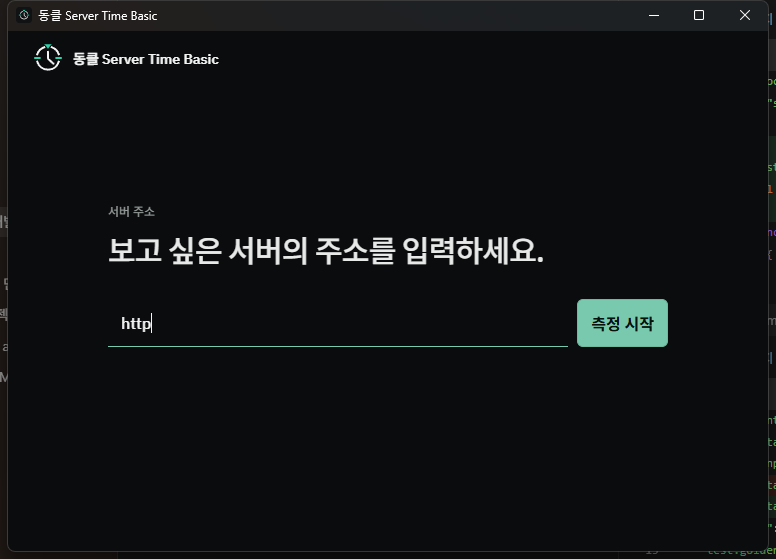
DongClock is a Tauri 2 application for Windows x64. The interface handles input and presentation; the Rust engine owns network requests, measurement state, validation, and adaptive scheduling.
WebView interfaceServer address, settings, measurement state, and time display.
Rust measurement engineHTTP probes, interval estimation, validation, and the monotonic anchor.
Network safety checksAllows HTTP/HTTPS, blocks local and reserved targets, and revalidates every redirect.
FAQ / 07
Product behavior and purchase terms without hidden claims.
No. DongClock observes the target web server's HTTP Date header. It does not use standard NTP/PTP measurement or an external atomic-clock reference.
There is no fixed ±X ms guarantee. Results depend on HTTP Date resolution, network asymmetry, server and CDN clocks, and cache behavior. DongClock uses agreement and validation to avoid premature conclusions within those limits.
One Date response describes only a possible offset interval. Multiple intervals and RTT observations are needed to identify a consistent range and distinguish abnormal samples.
Any measurement creates HTTP requests. DongClock increases intervals after stability and backs off after errors or rate limiting to avoid sustained high-frequency polling.
Basic is designed around a 30-minute session and low request volume. Pro has no session time limit, gathers more evidence, separates response paths and timing behavior more finely, and applies precision candidates only after sufficient validation.
See the Microsoft Store product page for the price and purchase terms available in your country or region. This site does not show an unconfirmed fixed price.
Both Basic and Pro are installed from their Microsoft Store product pages, and updates are delivered through Microsoft Store.
No. DongClock measures and displays server time. It does not perform automatic clicking, reservations, or purchases.
Refund eligibility and procedure for Microsoft Store purchases follow Microsoft Store policy and applicable law in the purchase region. See the Refund Policy page for details.
Microsoft Store is the official channel for new Basic and Pro distribution. The buttons on this page will activate when the product-page links are public.
MICROSOFT STORE
Windows 10 / 11 x64 · DongClock Server Time 1.0.0
Microsoft Store is the official channel for new distribution. The buttons below will activate when the product pages are public.